Amazon EC2 Backup
NAKIVO Backup & Replication allows you to create native backups of Amazon EC2 instances. An Amazon EC2 instance backup is a point-in-time copy of an entire instance, stored in a dedicated folder called Backup Repository.
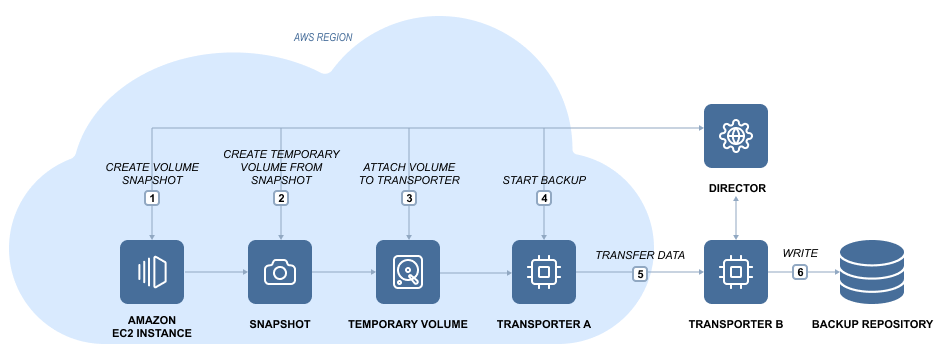
Here is how NAKIVO Backup & Replication performs Amazon EC2 instance backup:
-
Takes snapshots of the EBS volumes attached to the Amazon EC2 instance.
-
Converts snapshots to temporary volumes and attaches them to the Transporter instance.
-
Reads data from the temporary volumes and sends it to the Backup Repository.
-
Detaches and removes the volumes.
To back up VMware VMs to Amazon EC2, do the following steps:
-
Add an Amazon EC2 Account to the product's Inventory.
-
Deploy a Transporter to the Amazon EC2 Region where you want to create a Backup Repository.
-
Create a Backup Repository in the Amazon EC2 Region.