Self-Backup Feature
The Self-Backup feature provides automated protection for everything you configure in NAKIVO Backup & Replication. A comprehensive data protection solution must back up not only VMs, but also its own configuration. There are several scenarios in which this becomes critical. For example, the VM running NAKIVO Backup & Replication may become corrupted, infected by malware, or accidentally deleted. Regardless of the cause, restoring the product as quickly as possible is essential.
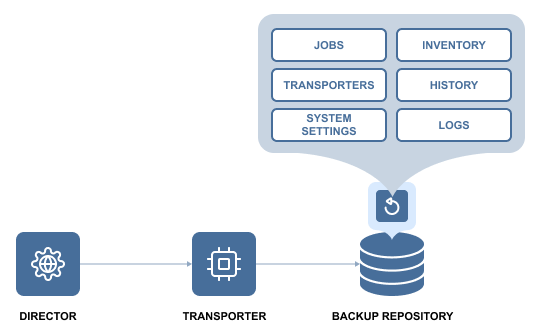
Although a new instance of NAKIVO Backup & Replication can be deployed in less than one minute, you would still need to restore the product configuration, including jobs, inventory, and backup history. To simplify this process, NAKIVO Backup & Replication automatically backs up the entire configuration. This includes all jobs, inventory data, information about connected Transporters, Backup Repositories, and other system settings.
The Self-Backup feature is enabled by default. NAKIVO Backup & Replication creates self-backups on a daily basis and sends them to the first five available Backup Repositories. By default, each self-backup is retained for five days. If needed, you can customize the backup targets, schedule, and retention policy.
If unintended changes are made to the product configuration, you can easily roll back to a previous system state using a self-backup. Migrating the configuration to a new product instance is also straightforward. You simply deploy a new instance of NAKIVO Backup & Replication, import a Backup Repository that contains a self-backup, and select the desired recovery point. The complete product configuration, along with all settings, is restored.
The Self-Backup feature saves time and provides peace of mind by ensuring reliable protection of everything you configure in NAKIVO Backup & Replication.
For information on the Self-Backup configuration, refer to Self-Backup.