Network Acceleration
Whether you run VM backup and replication jobs during business hours or send VM backups and replicas offsite over the Internet, efficient use of network bandwidth is critical. NAKIVO Backup & Replication provides the Network Acceleration feature to speed up VM backup and replication jobs, shorten backup windows, and reduce network load simultaneously.
When network acceleration is enabled, NAKIVO Backup & Replication can increase VM backup, replication, and recovery performance by up to two times in WAN environments and busy LAN networks.
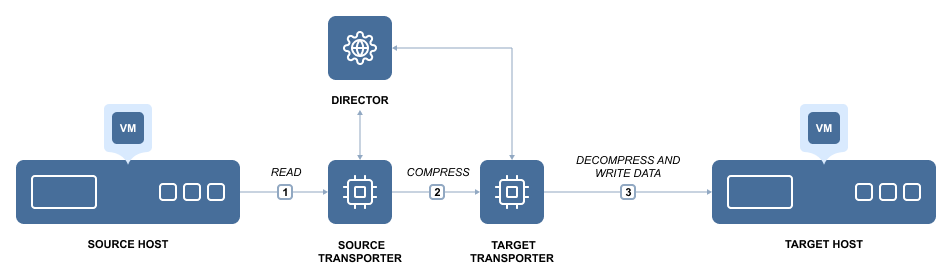
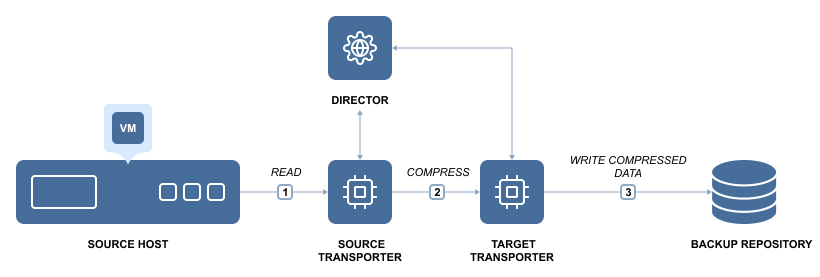
Network acceleration is achieved by the use of two instances of Transporter. Transporter is the product component that performs all data protection and recovery tasks, such as backup, replication, recovery, encryption, and so on. To simplify deployment and configuration, one instance of Transporter is automatically installed with NAKIVO Backup & Replication.
To enable Network Acceleration, you just need to install another Transporter instance locally or offsite and then enable Network acceleration in your job. When the job is executed, the source Transporter will read the data, compress and optimize it, and then send the data to the target Transporter. By using Network Acceleration, you can reduce the amount of data that is transferred over the network, which also means that your jobs will complete faster.
Network Acceleration for Backup
Network Acceleration for Replication