Log Truncation
With NAKIVO Backup & Replication, you can remove (truncate) transaction log files of Microsoft Exchange and Microsoft SQL servers which will allow you to reduce the size of backups and, as a result, to optimize the use of storage space. Log truncation can be enabled on the Options page of backup and replication jobs.
Microsoft Exchange Log Truncation
Microsoft Exchange is a leading platform for email, calendaring, and messaging services. To protect data from unintended deletion or modification, every change made to a Microsoft Exchange database is recorded in transaction logs. These logs can later be replayed to recover data that was modified or removed. While this mechanism enhances data protection, it also introduces a challenge. Because the Microsoft Exchange database is constantly changing, transaction logs continue to grow over time. If they are not removed periodically, they can consume all available disk space and potentially cause the server to fail.
NAKIVO Backup & Replication can create application-consistent backups of VMware and Hyper-V VMs and automatically remove transaction log files from Microsoft Exchange 2013, 2016, and 2019 servers. After a successful backup is completed, NAKIVO Backup & Replication connects to the Microsoft Exchange server, identifies transaction log files that have already been committed to the database, and removes or truncates those files.
As a result, NAKIVO Backup & Replication ensures regular, application-consistent backups of Microsoft Exchange servers while preventing transaction log files from consuming excessive disk space.
Microsoft SQL Server Log Truncation
Microsoft SQL Server tracks all database transactions by recording them in transaction log files, which use the .ldf extension. These logs are critical for maintaining database integrity and for restoring data by replaying recorded changes. However, transaction log files grow continuously and can eventually exhaust available disk space, potentially leading to server crashes or data loss.
Transaction log management presents a balance between two requirements. On one hand, transaction logs must be retained to allow data recovery in the event of deletion, corruption, or unexpected changes. On the other hand, logs must be removed or truncated to free up disk space. Removing logs without first backing them up can compromise recoverability.
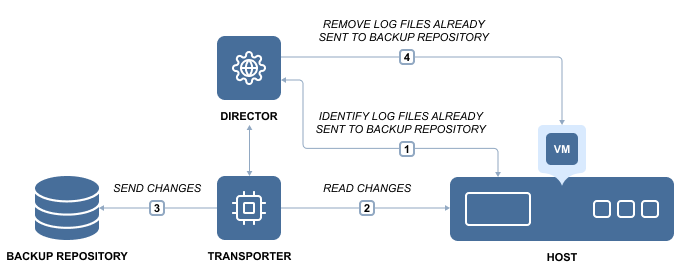
The recommended approach is to first back up the entire VMware or Hyper-V VM running Microsoft SQL Server, including all transaction log files, and then remove or truncate those log files on the source VM.
NAKIVO Backup & Replication supports transaction log truncation for Microsoft SQL Server 2008 and later versions. The product follows best practices by performing transaction log truncation automatically after successful VM backup and replication, providing a simple set-it-and-forget-it experience.
To free up VM storage space, NAKIVO Backup & Replication performs the following steps:
-
Backs up or replicates the entire VMware or Hyper-V VM running Microsoft SQL Server.
-
Identifies transaction log files that have already been committed to the database after the backup or replication completes successfully.
-
Truncates the committed transaction log files on the source VM, freeing up disk space.
As a result, you obtain a VM backup or replica that includes all transaction log files. Although these log files can be large, NAKIVO Backup & Replication reduces backup size by using backup deduplication and compression features. At the same time, the original VM remains free of accumulated transaction logs and can be recovered to a specific recovery point using the corresponding VM backup or replica if needed.