Instant VM Recovery - Flash Boot
The Flash Boot feature allows you to boot a VM directly from compressed and deduplicated backups, enabling fast recovery during an outage. When a business-critical machine goes down, even short periods of downtime can result in significant financial and operational impact. With NAKIVO Backup & Replication, you can recover entire machines from backups in minutes. The Flash Boot feature makes this possible by allowing machines to be started directly from backups without performing a full recovery beforehand.
The Flash Boot feature works out of the box and does not require any special configuration. To start a machine, simply select a backup, choose a recovery point, and specify a recovery location, such as a host, resource pool, or cluster where the recovered machine should run. After you start the process, the machine boots almost immediately.
Once the machine is running, you can migrate it to the production environment for permanent recovery. The backup from which the VM is booted remains unaffected throughout the process. Any changes made to the running VM do not modify or remove data stored in the VM backup.
In addition to fast VM recovery, the Flash Boot feature provides several additional capabilities. For example, it allows you to:
-
Access files, folders, and application objects from any application on any supported operating system
-
Test system updates and application patches before applying them to production machines
-
Verify backups by confirming that operating systems and applications start correctly
-
Copy VMDK or VHDX files and then delete the temporary virtual machine
How the Flash Boot Feature Works
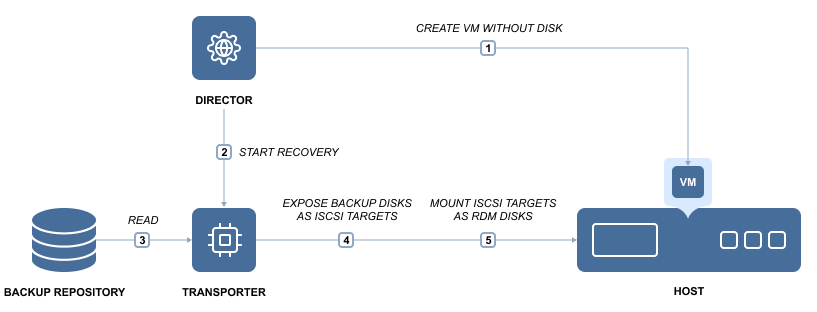
NAKIVO Backup & Replication consists of two primary components: the Director, which serves as the management component, and the Transporter, which performs data protection and recovery tasks. By default, both components are automatically installed, enabling all features immediately after deployment.
When a Flash Boot job is started, the Director creates a new VM without disks on the target server. It then instructs the Transporter to expose the machine disks stored in the Backup Repository as iSCSI targets. Finally, the Director mounts the exposed disks to the newly created VM.
This fully automated process completes in seconds, after which the machine operating system begins booting. Once the machine is online, it can be migrated to the production environment using the hypervisor’s native live migration functionality.
Cross-Platform Flash Boot
NAKIVO Backup & Replication also allows you to perform Flash Boot for VMware VMs directly from physical machine backups. If a business-critical physical machine becomes unavailable, you can use Cross-Platform Flash Boot to recover it instantly without manually installing a new operating system or applications. The recovered machine can be used immediately as a testing or temporary environment and later migrated for permanent use.
To learn how to create recovery jobs using the Flash boot feature, refer to