Hot Add for VMware
The Hot Add Data Transfer mode significantly improves VM backup and replication speed while reducing network load. With this mode, NAKIVO Backup & Replication reads data directly from VM datastores, bypassing the host’s TCP/IP stack, which would otherwise consume network resources and affect other VMs running on the same host.
NAKIVO Backup & Replication achieves this by mounting VM snapshots using the Hot Add mechanism and reading VM data directly from the datastore through the host’s storage I/O stack. This approach minimizes network traffic and helps ensure faster, more efficient backup and replication operations.
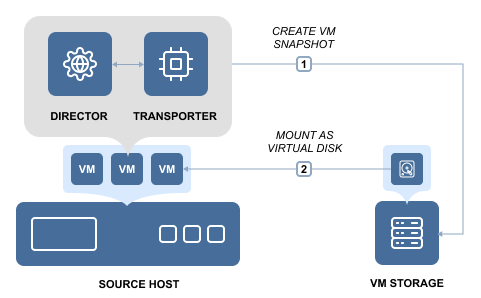
By default, NAKIVO Backup & Replication will automatically attempt to use the Hot Add mode for VM backup and replication jobs. Please check the appropriate feature requirements section for prerequisites and limitations.