Application and Database Support
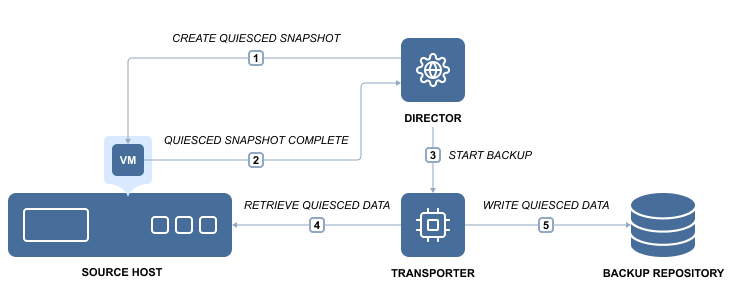
When you back up a VM that runs Active Directory, Microsoft SQL Server, Microsoft Exchange, or other applications or databases, it is essential to ensure that all application data remains consistent in the backup. This is important because some data and in-memory transactions may be incomplete at the moment the VM backup is taken. If no steps are taken to flush memory and pending I/O operations, the resulting backups will be crash-consistent. This situation is similar to abruptly powering off a physical server and then turning it back on. While most modern applications and databases can recover from a crash-consistent state, this often requires additional manual restore steps and increases the risk of data loss.
To ensure consistent backups, NAKIVO Backup & Replication offers the application awareness feature, known as app-aware mode. For Windows-based environments, the solution relies on the Microsoft Volume Shadow Copy (VSS) service running inside VMs to perform application-consistent VM backup and replication. If your application is not VSS-aware or runs on Linux, it provides you with the ability to run custom pre-freeze and post-thaw scripts to enable application-consistent VM backup and replication. A pre-freeze script runs before a VM snapshot is taken, and a post-thaw script runs after the snapshot is created.
With app-aware mode enabled, your backups and replicas include consistent application and database data, eliminating the need for additional configuration steps. This allows you to instantly recover full VMs as well as Microsoft Exchange and Active Directory objects—such as emails or users—directly from a compressed and deduplicated backup. If app-aware mode is disabled, NAKIVO Backup & Replication creates standard (non-quiesced) snapshots of source volumes. In the event of a failure, the solution reads data directly from the source volumes without generating an error.
App-aware mode can be enabled or disabled on the relevant page of the backup and replication job wizard for all supported platforms.
Application Awareness for Amazon EC2 Instances
NAKIVO Backup & Replication allows you to create application-consistent replicas of Amazon EC2 Instances. The application awareness process differs between Windows-based and Linux-based Instances.
Application Awareness for Windows-based Amazon EC2 Instances
NAKIVO Backup & Replication provides application awareness for supported Windows operating systems by using Microsoft Volume Shadow Copy (VSS) service. If application awareness is enabled for a Windows-based Instance, NAKIVO Backup & Replication does the following:
-
Connects to the source Instance using credentials provided.
-
Automatically deploys a NAKIVO VSS Driver into the Instance OS.
-
With the help of the VSS driver, creates application-consistent snapshots of the Instance's EBS volumes.
-
Automatically removes the VSS driver from the Instance OS.
Application Awareness for Linux-based Amazon EC2 Instances
For Linux-based Instances, NAKIVO Backup & Replication supports custom pre-freeze and post-thaw scripts to ensure application awareness. The pre-freeze script is executed before the Instance snapshot is taken, and the post-thaw script runs after the snapshot is complete.
Pre-Conditions for Application Awareness on Linux-based Instances
-
Create pre-freeze and post-thaw scripts tailored to your applications.
-
Ensure that SSH access is enabled on the Instances.
-
Place the scripts in the correct directories on each Instance:
-
Pre-freeze: /
usr/sbin/pre-freeze-script -
Post-thaw:
/usr/sbin/post-thaw-script
-